Build a Minesweeper Game with Rust and Bevy Engine
The original text was written in Chinese in March 2021. In July 2025, it was translated into English using ChatGPT and manually proofread.
Background
I don’t have any background in game development, or even in static languages. Back in 2015, when Rust 1.0 was released, a friend recommended the language to me. However, the learning curve was quite steep, and after trying a simple “hello world,” I gave up on it. Later, I started hearing more about how Rust was being used for front-end applications related to wasm, which got me interested again recently.
During my years working in the front-end field, I’ve realized it’s important to broaden my skill set instead of limiting myself to the daily routines built around keywords like Vue.js and React (just like the common struggles of back-end “CURD boys”). So, I took advantage of the Spring Festival holiday to read through The Rust Programming Language (TRPL) and practice with rustlings. Since just reading and doing exercises didn’t feel solid enough, I decided to spend the rest of my break actually making a small game.
Choosing the game engine was simple—I found Bevy, which was trending on GitHub, and started using it. Through Bevy, I also learned about the ECS architecture, which is common in game development. Bevy itself is built on this architectural pattern.
Rust’s design gives me the feeling that it stands on the shoulders of those who came before. I kept noticing this throughout the whole experience, whether it was the language design, package management, linting, or testing.
The full source code for this project can be found at https://github.com/lauigi/bevy_mine_sweeper

Preparation
Language
Installing Rust
Refer to the official guide. Rustup is very convenient—I’ve tried it on both Mac and Windows. On Windows, pay extra attention to the “Microsoft C++ Build Tools” during installation.
Engine
As usual, after adding the Bevy dependency in the cargo.toml file, cargo will automatically install it when you run cargo run or cargo test. When I first imported Bevy and tried to compile, I got some garbled errors mentioning “d3d12.lib.” I guessed it was because the library couldn’t be found. After some searching, I discovered that the DirectX SDK is no longer provided separately; instead, you need to install the Windows SDK, which can be installed via the “Microsoft C++ Build Tools” mentioned earlier. So, reinstalling and making sure to check the right options solved the problem.
Learning Experience
At least for me, it’s important to get clear and quick feedback for every small step when learning by doing. In the beginning, besides frequently using the println! macro, I have to praise Rust’s convenient unit testing features. Rust allows developers to write test code directly in each .rs file, and there’s no need for extra configuration. Just run cargo test, and cargo will find and execute all the test code blocks in your source files. When I started working on the engine parts, I relied on visual feedback and some debug text floating on the window to directly check the results.
Basic Structure
The game mechanics of Minesweeper are quite simple. For example, in an 8 x 8 grid of 64 squares, 10 random squares are chosen to be mines, while the rest of the squares display the number of mines in their surrounding 8 squares. The goal is to win by revealing all the non-mine squares.
At the very beginning, it’s necessary to think about how to represent the game’s map data. In my approach, I used a two-dimensional array to store each mine block. Also, it might be convenient (or not) to have the map store its own width and height, so I just included them together for now:
struct MinePlayground {
    width: usize,
    height: usize,
    map: Vec<Vec<MineBlock>>,
}
A Vec in Rust is a dynamic array, which you can think of as similar to the Array type in JavaScript. MineBlock is a struct for each mine block, which hasn’t been implemented yet.
Next, let’s analyze the features of each mine block. On one hand, a block can be one of several types: “mine”, “number”, or “empty” (actually, empty could be treated as number 0, but at this early stage, I didn’t worry about whether to merge them, so I kept them separate for now). On the other hand, each block can also be in one of several states: “unclicked,” “flagged as a mine,” “question mark,” or “opened.” So, I designed two enums to represent these two sets of data:
#[derive(Debug)]
enum BlockType {
    Mine,
    Space,
    Tip(usize),
}
#[derive(Debug)]
enum BlockStatus {
    Shown,
    Hidden,
    QuestionMarked,
    Flaged,
}
Here’s a quick explanation of #[derive(Debug)]: this line allows the corresponding struct or enum to be formatted and printed conveniently for debugging purposes. You can refer to Appendix C of The Rust Programming Language (TRPL) for more details. So, the initial MineBlock struct looks like this:
struct MineBlock {
    btype: BlockType,
    bstatus: BlockStatus,
}
Once the data is ready, the first thing to try is implementing the function to generate the map. This generation feature should be at the level of the MinePlayground, so I made it a method of the MinePlayground struct:
impl MinePlayground {
    pub fn init(&width: &usize, &height: &usize, &mine_count: &usize) -> Result<MinePlayground, String> {
        if !SIZE_RANGE.contains(&width) || !SIZE_RANGE.contains(&height) || !MINE_COUNT_RANGE.contains(&mine_count) {
            return Err(String::from("Parameters not in specific range!"));
        }
        // other code here
    }
}
When designing the function signature, I realized that this method doesn’t need ownership of data like width, height, or mine count—using references is enough. For the return value, since there could be cases of invalid parameters (even though this won’t actually happen, it’s a good way to practice Rust), I used the Result<T, E> enum as the return type. On success, it returns a MinePlayground; on failure, it returns an error message. Since I expected this to be a public-facing method, I added the pub keyword right away. Constants like SIZE_RANGE represent the valid value ranges I defined:
static SIZE_RANGE: std::ops::Range<usize> = 5..200;
Of course, these constants didn’t end up being very useful later on.
If I were to write a unit test for this method, it would look something like this:
#[cfg(test)]
mod tests{
    use super::*;
    #[test]
    fn test_init_map() {
        assert!(MinePlayground::init(&0, &0, &0).is_err());
        assert!(MinePlayground::init(&8, &8, &10).is_ok());
    }
}
Back to the main topic. Next, the challenge is how to randomly place a specific number of mines on the map. The solution I found is to use the shuffle method from Rust’s rand crate, which can randomly shuffle the order of a sequence:
let seeds_length = width * height;
let mut mine_seeds: Vec<bool> = Vec::with_capacity(seeds_length.into());
for i in 0..seeds_length {
    if i < mine_count { mine_seeds.push(true); }
    else { mine_seeds.push(false); }
}
let mut rng = rand::thread_rng();
mine_seeds.shuffle(&mut rng);
In other words, you create a dynamic array whose length equals the total number of blocks, put all the mines (marked as true) at the front, and then use shuffle to randomize the order. Here’s a tip: a dynamic array created with methods like with_capacity in Rust actually isn’t filled with content yet, so you can’t use iterators on it—in this case, I used a for in loop instead.
Next, I split this one-dimensional dynamic array into a “two-dimensional” array, where each row has width elements. Looking back, if I had written a proper coordinate conversion method, maybe I wouldn’t need to split it like this. During this step, I also filled in the MineBlock struct directly:
let mut mine_map: Vec<Vec<MineBlock>> = vec![];
for i in 0..height {
    mine_map.push(mine_seeds[i * width..i * width + width].iter().map(|&is_mine_block| {
        MineBlock {
            btype: if is_mine_block { BlockType::Mine } else { BlockType::Space },
            ..Default::default()
        }
    }).collect());
}
The reason for using the Default trait is that if I add more fields to the struct in the future and don’t need to define them here, I won’t have to modify this part of the code—it’s very convenient. After filling the map with mine blocks, the next step is to generate hint data for the other blocks. For this, some helper functions are needed. First, I used a method to get the coordinates of the blocks surrounding a given block (the approach is a bit brute-force, and I’m not sure if there’s a better way):
fn get_surroundings(&x: &usize, &y: &usize, &max_width: &usize, &max_height: &usize) -> Vec<(usize, usize)> {
    let max_x = max_width - 1;
    let max_y = max_height - 1;
    let mut r = vec![];
    if x > 0 { r.push((x - 1, y)); }
    if x < max_x { r.push((x + 1, y)); }
    if y > 0 {
        r.push((x, y - 1));
        if x > 0 { r.push((x - 1, y - 1)); }
        if x < max_x { r.push((x + 1, y - 1)); }
    }
    if y < max_y {
        r.push((x, y + 1));
        if x > 0 { r.push((x - 1, y + 1)); }
        if x < max_x { r.push((x + 1, y + 1)); }
    }
    r
}
In Rust, a line without a semicolon at the end is equivalent to return r;. Another thing I needed to do was implement an increment method for BlockType:
impl BlockType {
    fn increase (&mut self) {
        *self = match *self {
            Self::Tip(val) => Self::Tip(val + 1),
            Self::Space => Self::Tip(1),
            Self::Mine => Self::Mine,
        }
    }
}
impl MineBlock {
    fn add_tip(&mut self) {
        self.btype.increase();
    }
}
This way, the code for filling in the numbers during the loop can be a bit simpler:
for y in 0..mine_map.len() {
    let row = &mine_map[y];
    for x in 0..row.len() {
        if let BlockType::Space = mine_map[y][x].btype {
            let surroundings = get_surroundings(&x, &y, &width, &height);
            for (cur_x, cur_y) in surroundings.iter() {
                if let BlockType::Mine = mine_map[*cur_y][*cur_x].btype {
                    mine_map[y][x].add_tip();
                }
            }
        }
    }
}
Finally, after assembling the MinePlayground, I wrap it in Ok and return it—this basically completes the init method for now:
Ok(MinePlayground {
    width,
    height,
    map: mine_map,
})
From Data to Rendering the Initial Screen
This is the part where the Bevy engine comes into play.
pub fn game_app(config: GameConfig) {
    App::build()
        .add_resource(WindowDescriptor {
            vsync: false,
            width: cmp::max(config.width * BLOCK_WIDTH, MIN_WIDTH) as f32,
            height: cmp::max(config.height * BLOCK_WIDTH + Y_MARGIN, MIN_HEIGHT) as f32,
            title: String::from("Mine Sweeper"),
            resizable: false,
            ..Default::default()
        })
        .add_resource(config)
        .add_plugins(DefaultPlugins)
        .add_plugin(GamePlugin)
        .run();
}
First, you can customize some window parameters by adding the WindowDescriptor struct as a resource. In config, we have the pre-set map width and height. Based on implementations in other Minesweeper games, I decided to disable window resizing here. I also added config as a resource so it can be accessed later. DefaultPlugins is a set of default plugins provided by Bevy; you can refer to the documentation for more details, but generally, you can just include it unless you have special needs. GamePlugin contains the actual game logic for this project.
In the ECS (Entity Component System) model, entities and components are just data. All actions and rendering logic should be implemented in systems, which will read or modify entities and components as needed.
struct GamePlugin;
impl Plugin for GamePlugin {
    fn build(&self, app: &mut AppBuilder) {
        app.add_startup_system(setup.system());
    }
}
add_startup_system is used to add a system that will only be called once at startup, while a normal add_system will run on every tick.
Let’s start by thinking about some initialization settings:
fn setup(
    commands: &mut Commands,
    asset_server: Res<AssetServer>,
    mut texture_atlases: ResMut<Assets<TextureAtlas>>,
) {
    let font = asset_server.load("fonts/pointfree.ttf");
    let window = windows.get_primary().unwrap();
    commands
        .spawn(CameraUiBundle::default())
        .spawn(Camera2dBundle::default());
    commands.spawn(TextBundle {
        style: Style {
            align_self: AlignSelf::FlexEnd,
            position_type: PositionType::Absolute,
            position: Rect {
                top: Val::Px(5.0),
                left: Val::Px(5.0),
                ..Default::default()
            },
            ..Default::default()
        },
        text: Text {
            value: "debug text here".to_string(),
            font: font.clone(),
            style: TextStyle {
                font_size: 18.0,
                color: Color::rgba(0.0, 0.5, 0.5, 0.5),
                alignment: TextAlignment::default(),
            },
        },
        ..Default::default()
    }).with(DebugText);
    let texture_handle = asset_server.load("textures/block.png");
    let texture_atlas = TextureAtlas::from_grid(texture_handle, Vec2::new(SPRITE_SIZE, SPRITE_SIZE), 4, 1);
    let texture_atlas_handle = texture_atlases.add(texture_atlas);
    commands.insert_resource(texture_atlas_handle);
When I first started writing, I spent some time figuring out what kinds of parameters a system in Bevy can accept. It turns out that a system can take several specific types as parameters, such as Commands, Res, and Query. Commands can be used to add or remove entities, add or remove components from entities, or insert resources into the app. One thing to keep in mind is that changes made with Commands are not applied immediately—they usually take effect in the next frame or after the current stage ends.
CameraUiBundle and Camera2dBundle are bundles related to camera entities. TextBundle is used to display debug information in a prepared text box. The way layouts are written here feels a lot like CSS—or maybe all UI layout systems in different languages are actually pretty similar? At the end, I load the image used to display each mine block and parse it as a sprite sheet with 4 tiles, then insert it as a resource into the app.
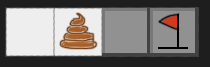 The image above is the game asset I prepared, which is the
 block.png mentioned earlier. The next step is the most time-consuming part of the actual development (and learning) process: figuring out how to draw the map data as graphics. Since I wanted to see some results quickly, I didn’t think about how to handle updates at this stage:
struct WindowOffset {
    x: f32,
    y: f32,
}
struct RenderBlock {
    pos: Position,
}

fn setup (/* other code */) {
    // other code
    commands.insert_resource(WindowOffset {
        x: window.width() as f32 / 2.0 - BLOCK_WIDTH as f32 / 2.0,
        y: window.height() as f32 / 2.0 - BLOCK_WIDTH as f32 / 2.0,
    });
}

fn init_map_render(
    commands: &mut Commands,
    texture_atlases: Res<Assets<TextureAtlas>>,
    atlas_handle: Res<Handle<TextureAtlas>>,
    window_offset: Res<WindowOffset>,
    config: Res<GameConfig>,
) {
    for y in 0..config.height {
        for x in 0..config.width {
            let texture_atlas = texture_atlases.get_handle(atlas_handle.clone());
            commands
                .spawn(SpriteSheetBundle {
                    transform: Transform {
                        translation: Vec3::new(
                            (x * BLOCK_WIDTH) as f32 - window_offset.x,
                            (y * BLOCK_WIDTH) as f32 - window_offset.y,
                            0.0
                        ),
                        scale: Vec3::splat(0.5),
                        ..Default::default()
                    },
                    texture_atlas,
                    sprite: TextureAtlasSprite::new(HIDDEN_INDEX as u32),
                    ..Default::default()
                })
                .with(RenderBlock { pos: Position { x, y } });
        }
    }
}
Basically, for each MineBlock, I draw a block on the canvas. HIDDEN_INDEX is the index in block.png that represents the hidden state. At the same time, I add a RenderBlock component to the entity, which might make it easier to query later. Since the initial drawing coordinates are at the center of the canvas, I also use an offset value calculated from the window and block sizes.
Before starting the next section, it’s time to inject the map data for a single game session into the app:
struct MapData {
    map_entity: Entity,
}

fn new_map(
    commands: &mut Commands,
    config: Res<GameConfig>,
) {
    commands.spawn((MinePlayground::init(&config.width, &config.height, &config.mine_count).unwrap(), ));
    commands.insert_resource(MapData {
        map_entity: commands.current_entity().unwrap(),
    });
}
While writing this, I suddenly realized that wrapping MinePlayground inside the MapData struct here might be a bit unnecessary. I’ll try to refactor this when I have time (setting a little goal for myself).
Responding to Clicks with Data Updates
Next, I want to make it so that when the user clicks with the mouse, the image of the corresponding mine block updates. To break this down, I should first capture mouse click events and update the data source. I easily found a way to get the mouse position on Stack Overflow, and after some adjustments, it looks like this:
struct CursorLocation(Vec2);

impl Plugin for GamePlugin {
    fn build(&self, app: &mut AppBuilder) {
        // other code
            .add_resource(CursorLocation(Vec2::new(0.0, 0.0)))
            .add_system(handle_movement.system());
    }
}

fn handle_movement(
    mut cursor_pos: ResMut<CursorLocation>,
    cursor_moved_events: Res<Events<CursorMoved>>,
    mut evr_cursor: Local<EventReader<CursorMoved>>,
) {
    for ev in evr_cursor.iter(&cursor_moved_events) {
        cursor_pos.0 = ev.position;
    }
}
Overall, I inserted the mouse position as a resource into the app and then listened for mouse events to update this resource. Before I start writing the code to handle click events, there are a few more features to prepare. One of them is a function to check if the mouse coordinates are within the clickable area:
fn get_block_index_by_cursor_pos(pos: Vec2, config: GameConfig) -> Option<(usize, usize)> {
    let x = (pos.x / BLOCK_WIDTH as f32).floor() as usize;
    let y = (pos.y / BLOCK_WIDTH as f32).floor() as usize;
    if (0..config.height).contains(&y) && (0..config.width).contains(&x) {
        return Some((x, y));
    }
    None
}
The other part is handling the core game logic for left-click and right-click actions:
pub enum ClickResult {
    Wasted,
    NothingHappened,
    Win,
}
impl MinePlayground {
    // ...
    pub fn click(&mut self, x: &usize, y: &usize) -> ClickResult {
        // code here
    }
    pub fn right_click(&mut self, x: &usize, y: &usize) {
        // code here
    }
}
In Minesweeper’s design, a left-click can affect the game state, so I defined a ClickResult enum to represent these outcomes: game over, win, or nothing happened. Clicking on an empty block (a 0 block) is a bit more complicated, since you also need to trigger a click on all its neighboring blocks. Handling right-clicks is simpler—it just cycles through the “closed,” “flagged,” and “question mark” states.
Rendering Based on Data
After implementing the main click response method, the game loop now needs to respond to the engine’s input events and call the corresponding handler. In Bevy, input is also treated as a resource:
fn handle_click(
    btns: Res<Input<MouseButton>>,
    cursor_pos: Res<CursorLocation>,
    config: Res<GameConfig>,
    mut mquery: Query<&mut MinePlayground>,
    map_data: Res<MapData>,
) {
    if btns.just_released(MouseButton::Left) {
        if let Some((x, y)) = get_block_index_by_cursor_pos(cursor_pos.0, *config) {
            let mut mp: Mut<MinePlayground> = mquery.get_component_mut(map_data.map_entity).unwrap();
            let click_result = mp.click(&x, &y);
            match click_result {
                ClickResult::Wasted => {
                    // code here
                },
                ClickResult::Win => {
                    // code here
                }
                _ => {}
            }
        }
    }
    if btns.just_released(MouseButton::Right) {
        if let Some((x, y)) = get_block_index_by_cursor_pos(cursor_pos.0, *config) {
            let mut mp: Mut<MinePlayground> = mquery.get_component_mut(map_data.map_entity).unwrap();
            mp.right_click(&x, &y);
        }
    }
}
Here, Query<&mut MinePlayground> is used to fetch the map entity that was previously added to the app. After confirming that the click happened within the bounds of a block, I pass the corresponding coordinates into the click handler, and finally process the result depending on the click_result. I’ll add the detailed handling later; for now, my focus is on reflecting data changes in the graphics.
Bevy provides a series of query filters like Added<T>, Mutated<T>, and Changed<T> (which, in Rust terms, are more like smart pointers) that let you listen only to entities that have actually changed. This way, you can update the display only when the map data changes—such as after a click:
fn render_map (
    query: Query<
        &MinePlayground,
        Changed<MinePlayground>,
    >,
    mut sprites: Query<(&mut TextureAtlasSprite, &RenderBlock)>,
) {
    // code here
}
Next, I had to figure out how to display the hint numbers on each block. At first, I thought about drawing text for each block using the UI system, but the issue is that Bevy’s UI and the 2D camera are separate systems, and getting everything lined up would take a lot of extra work. So, I decided to include the numbers directly in the sprite sheet as well. In the end, block.png was expanded to look like this: 
With more slots now, I needed to prepare a method to match each block’s state to the correct image:
impl MineBlock {
    fn get_sprite_index(&self) -> usize {
        match self.bstatus {
            BlockStatus::Flaged => 12,
            BlockStatus::QuestionMarked => 11,
            BlockStatus::Shown => {
                match self.btype {
                    BlockType::Mine => 9,
                    BlockType::Tip(val) => val,
                    BlockType::Space => 0,
                }
            },
            BlockStatus::Hidden => HIDDEN_INDEX,
        }
    }
}
With that, the content for render_map can now be filled in:
for mp in query.iter() {
    for (mut sprite, rb) in sprites.iter_mut() {
        sprite.index = mp.map[rb.pos.y][rb.pos.x].get_sprite_index() as u32;
    }
}
Organizing Game Stages
The previous development has covered the core functionality of the game, but right now there’s no way to restart each game session. So, I need to organize and implement game stages. As a game engine, Bevy allows you to specify that certain systems only run at specific stages. Here, I first define an enum to describe each stage:
#[derive(Debug, Clone, PartialEq)]
enum GameState {
    Prepare,
    Ready,
    Running,
    Over,
}
After reorganizing, the build process looks like this:
impl Plugin for GamePlugin {
    fn build(&self, app: &mut AppBuilder) {
        app.init_resource::<ButtonMaterials>()
            .add_resource(CursorLocation(Vec2::new(0.0, 0.0)))
            .add_plugin(FrameTimeDiagnosticsPlugin)
            .add_resource(State::new(GameState::Prepare))
            .add_startup_system(setup.system())
            .add_system(fps_update.system())
            .add_system(debug_text_update.system())
            .add_system(restart_button_system.system())
            .add_startup_system(new_map.system())
            .add_system(handle_movement.system())
            .add_system(handle_click.system())
            .add_system(render_map.system())
            .add_stage_after(stage::UPDATE, STAGE, StateStage::<GameState>::default())
            .on_state_enter(STAGE, GameState::Prepare, init_map_render.system())
            .on_state_enter(STAGE, GameState::Ready, new_map.system());
    }
}
Of course, you also need to add stage control statements to methods like the click handler, and add a button to restart the game. I won’t go into those specific code details here.
Experience Optimization
A common quality-of-life improvement in Minesweeper is that if the player’s first click lands on a mine, the game secretly moves that mine before checking for a game-over. With the current structure, this feature is fairly easy to add: just implement a fix method for the MinePlayground struct. This method will turn the clicked cell into a non-mine, reduce the hint numbers for neighboring blocks by one, and update the hint number for the current cell according to how many mines are around it.
To relocate the removed mine, simply traverse the map starting from one corner to find the first empty, non-mine space (making sure not to pick the cell that was just clicked). Then, update the hint numbers for the surrounding cells.
TODOs
Here are some essential Minesweeper features that I got too lazy to finish.
Timer
Implementing a timer should be easy by referring to the cheatbook. Just use a time resource and bind it to the game’s stage.
Count of Flagged Blocks
Just add a new field to the MinePlayground struct and update it in the click event callback.
Summary
Bevy is still in development; its book is incomplete, and the unofficial documentation (cheatbook) is somewhat scattered, so beginners will need to spend extra time and effort to gather the necessary knowledge. Coding in Rust means fighting with the compiler—at least, that’s been my experience as a beginner. It took me about three or four days to finish this project (not counting breaks for housework, theory exams for icode, and so on).
As for Rust/Wasm’s applications in true front-end development (beyond things like Deno), I haven’t really seen use cases that can replace JavaScript, except for heavy computation (like file hashing for cloud storage uploads or maybe a player) or situations where security is crucial (since a big chunk of wasm is probably better than “pseudo-secure” obfuscated JavaScript). I recently saw that yew added a React-like hooks API, which makes me wonder if even the pros don’t have a clear direction for future development. I’d also like to hear what other frontend developers at the company think.
Well, that’s all!